Best Netflix VPNs: Watch Netflix Reliably Anywhere in 2026
Reading time: 16 min
Last Updated: Oct 9, 2025
-
![Sayb Saad]()
-
![Sarah Frazier]()
Fact-Checked by Sarah Frazier Former Content Manager


Netflix has different libraries depending on where you watch from. You might open it abroad and notice your favorite show is missing or get the dreaded error code. That happens because Netflix detects your location and blocks content that’s not licensed in that region.
It’s frustrating when you pay for a subscription but can’t access your catalog. Many VPNs claim to work with Netflix, but most fail — either they’re too slow or trigger proxy errors. What you need is a VPN that actually keeps pace with Netflix’s strict detection.
After months of testing, we found a few that still work reliably. ExpressVPN is our top pick because it has servers in 105 countries, built-in obfuscation on every server, and even a native Apple TV app. You can test it out yourself with a 30*-day refund guarantee. Editor’s Note: Transparency is one of our core values at WatchEverywhere, so you should know we are in the same ownership group as ExpressVPN. That said, our detailed reviews follow a strict methodology that examines all relevant performance factors to help you arrive at your own informed conclusion.
Stream Netflix with ExpressVPN
Quick Guide: Best VPNs for Streaming Netflix in 2026
- ExpressVPN — Works with Netflix libraries worldwide thanks to automatic obfuscation and the Lightway protocol for smooth UHD streaming.
- CyberGhost — Dedicated streaming servers that make Netflix accessible across the globe, though the monthly plan only gives you a 14-day refund window
- Private Internet Access (PIA) — Flexible state-level servers let you stream Netflix from anywhere in the US, but its US jurisdiction may concern privacy-focused users.
- NordVPN — Netflix works instantly on all servers with SmartPlay, although it lacks dedicated streaming servers compared to rivals.
- Surfshark — Great for school, work, or public WiFi with unlimited device support, but distant servers and MultiHop can be slower for streaming.
Editor’s Note: We value our relationship with our readers, and we strive to earn your trust through transparency and integrity. We are in the same ownership group as some of the industry-leading products reviewed on this site: ExpressVPN, CyberGhost, Private Internet Access, and Intego. That said, our detailed reviews follow a strict methodology that examines all relevant performance factors to help you arrive at your own informed conclusion.
The Best VPNs for Streaming Netflix in 2026
1. ExpressVPN — Best Overall VPN for Global Netflix Access

Key Features:
- 3,000+ servers in 105 countries for consistent Netflix access
- Lightway protocol delivers fast speeds for buffer-free streaming
- MediaStreamer Smart DNS lets you stream on gaming consoles and smart TVs
- Stream Netflix on up to 14 devices
- 30*-day money-back guarantee for first-time users
ExpressVPN can access global Netflix libraries very reliably. With servers in 105 countries, it regularly refreshes its IP addresses to stay on top of geo-blocks. My team could access Netflix US, UK, Canada, Australia, Germany, and more. All servers have built-in obfuscation, so you can access Netflix even on restricted networks that block streaming traffic.
Speeds are another strong point with ExpressVPN. Its Lightway protocol, coded in Rust, is made for quick handshakes and stable long sessions. In my tests, nearby servers gave me over 150 Mbps on average — fast enough for smooth UHD Netflix streams without buffering. Even during peak evening hours, connections stayed consistent.
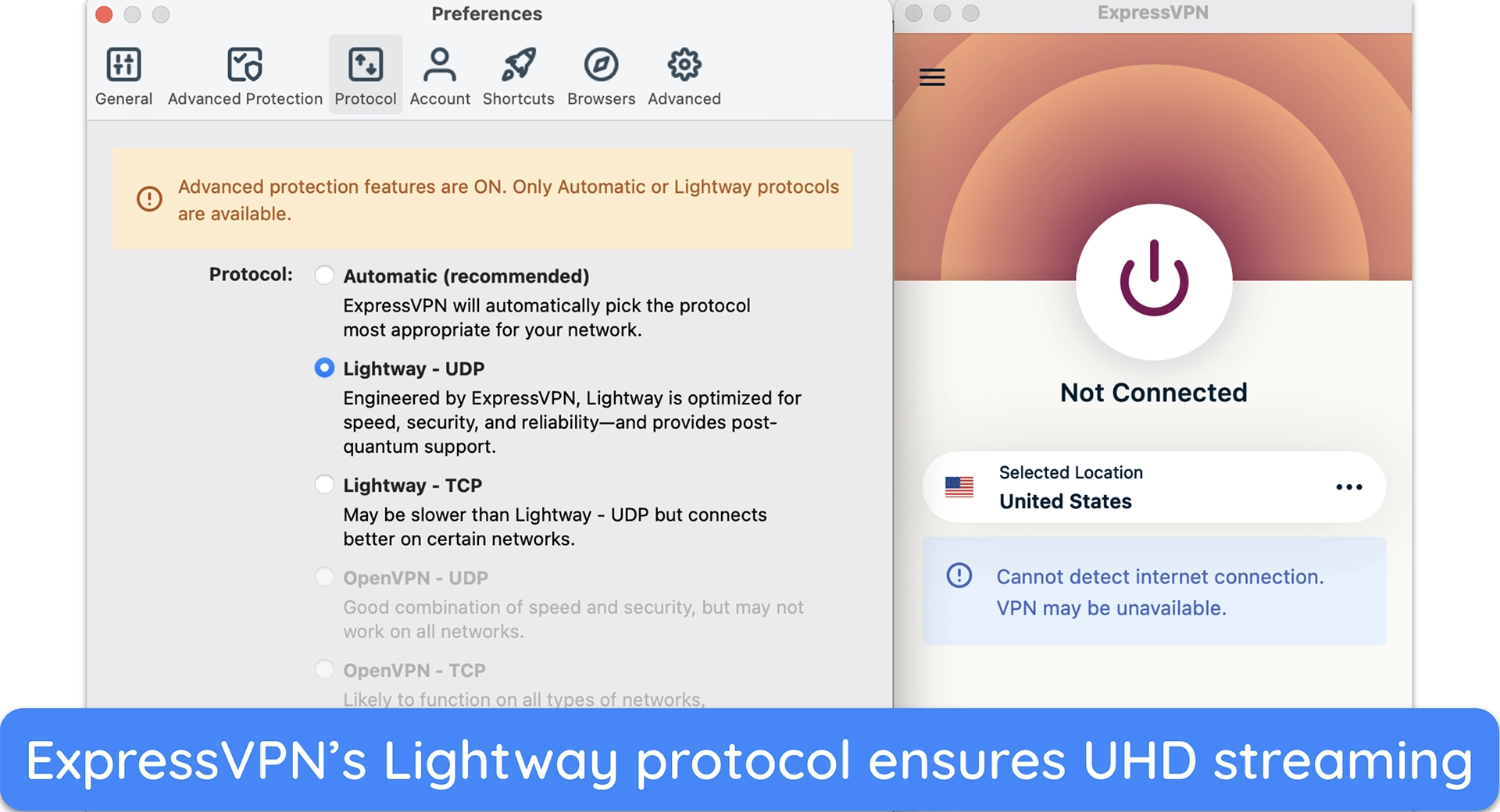
Its Smart Location feature automatically connects you to the fastest nearby server, which is perfect when you want to start streaming immediately. With MediaStreamer Smart DNS, you can stream Netflix even on devices that don’t natively support VPNs, like PS5. You can also use split tunneling to just route your Netflix traffic through the VPN, with everything else untouched.
The only downside to ExpressVPN is that it’s more expensive than its rivals. However, the consistency in performance and reliability in accessing Netflix and other streaming services make it a worthwhile investment. You can test ExpressVPN out yourself as it comes with a 30*-day money-back guarantee for first-time users.
Editor’s Note: Transparency is one of our core values at WatchEverywhere, so you should know we are in the same ownership group as ExpressVPN. That said, our detailed reviews follow a strict methodology that examines all relevant performance factors to help you arrive at your own informed conclusion.
ExpressVPN works with: Windows, macOS, iOS, Android, Linux, Chrome, Firefox, PlayStation, Xbox, Nintendo Switch, Apple TV, Android TV, Amazon Fire TV, smart TVs, and routers
2026 Update! You can subscribe to ExpressVPN for as low as per month with a 2-year + 4 months purchase (save up to %)!! This is a limited offer so grab it now before it's gone. See more information on this offer here.
2. CyberGhost — Netflix-Optimized Servers in 15+ Countries

Key Features:
- 11,690+ servers in 100 countries and Netflix-optimized connections
- Excellent speeds on streaming and regular servers
- Smart Rules for automatic Netflix connections
- Supports up to 7 devices at once
- 45-day money-back guarantee
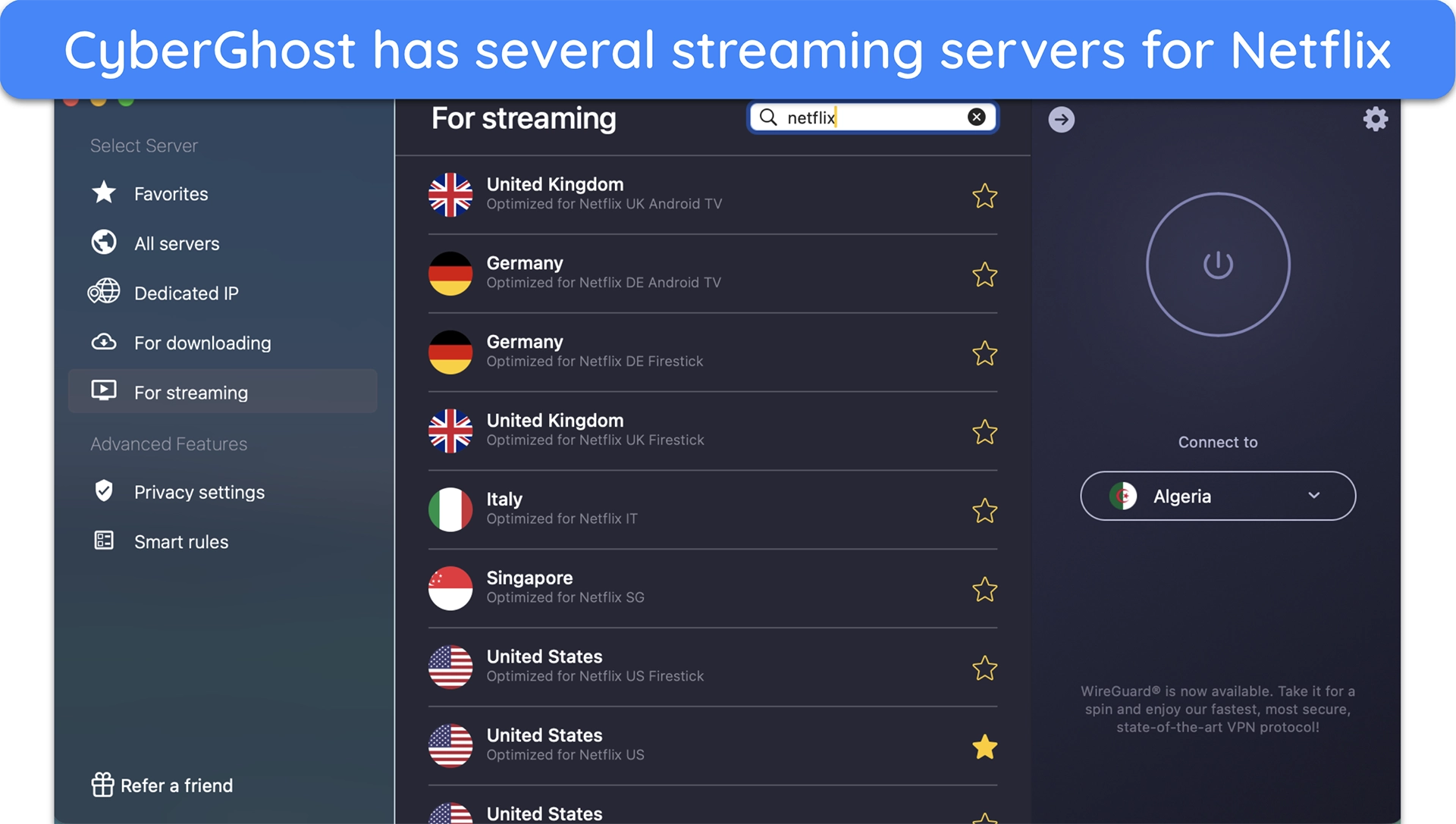
CyberGhost is one of the easiest VPNs for streaming Netflix with its streaming servers. These servers are labeled for specific platforms and countries, so you don’t waste time guessing which one works. Just search for Netflix and find an optimized server in your country. You can also ‘favorite’ a server so you don’t have to look for it the next time.
In tests, we noticed that CyberGhost’s speeds on streaming servers were slightly faster than regular counterparts. The difference wasn’t that apparent in closeby locations, which maintained near-baseline speeds. However, over a distance of 4,000 miles, the difference was about 6% of our total speed.
With the Smart Rules feature, you can set CyberGhost to launch automatically when you open the Netflix app (or configure it to any other app, for that matter). Additionally, you can extend this automation to system start-up or when you join a network, which is really nice if you like to stream on your metro’s WiFi on your way to work.
A minor drawback of CyberGhost is that its monthly plan has a shorter refund window of just 14 days. However, that’s still enough to try it out risk-free if you’re unsure. If you go for longer subscriptions, you get a generous 45-day money-back guarantee.
Editor’s Note: Transparency is one of our core values at WatchEverywhere, so you should know we are in the same ownership group as CyberGhost VPN. That said, our detailed reviews follow a strict methodology that examines all relevant performance factors to help you arrive at your own informed conclusion.
CyberGhost works with: Windows, macOS, iOS, Android, Linux, Chrome, Firefox, PlayStation, Xbox, Apple TV, Android TV, Amazon Fire TV, smart TVs, and routers
2026 Update! You can subscribe to CyberGhost for as low as per month with a 2-year purchase (save up to %)!! This is a limited offer so grab it now before it's gone. See more information on this offer here.
3. Private Internet Access — Massive Server Network With Connections in All US States

Key Features:
- 29,650+ servers in 90 countries and connections in all US states
- Provides near-baseline speeds on nearby and mid-range servers
- Customizable encryption and streaming-optimized servers in the US, UK, and more
- Stream on unlimited devices on a single subscription
- Comes with a 30-day money-back guarantee
PIA has a massive server network that covers all 50 US states. This gives you unmatched flexibility when streaming Netflix, as you can find a nearby server no matter where you are in the continental US. You’ll also find streaming-optimized servers in over 10 countries, including the US, UK, Canada, Denmark, Japan, and more.
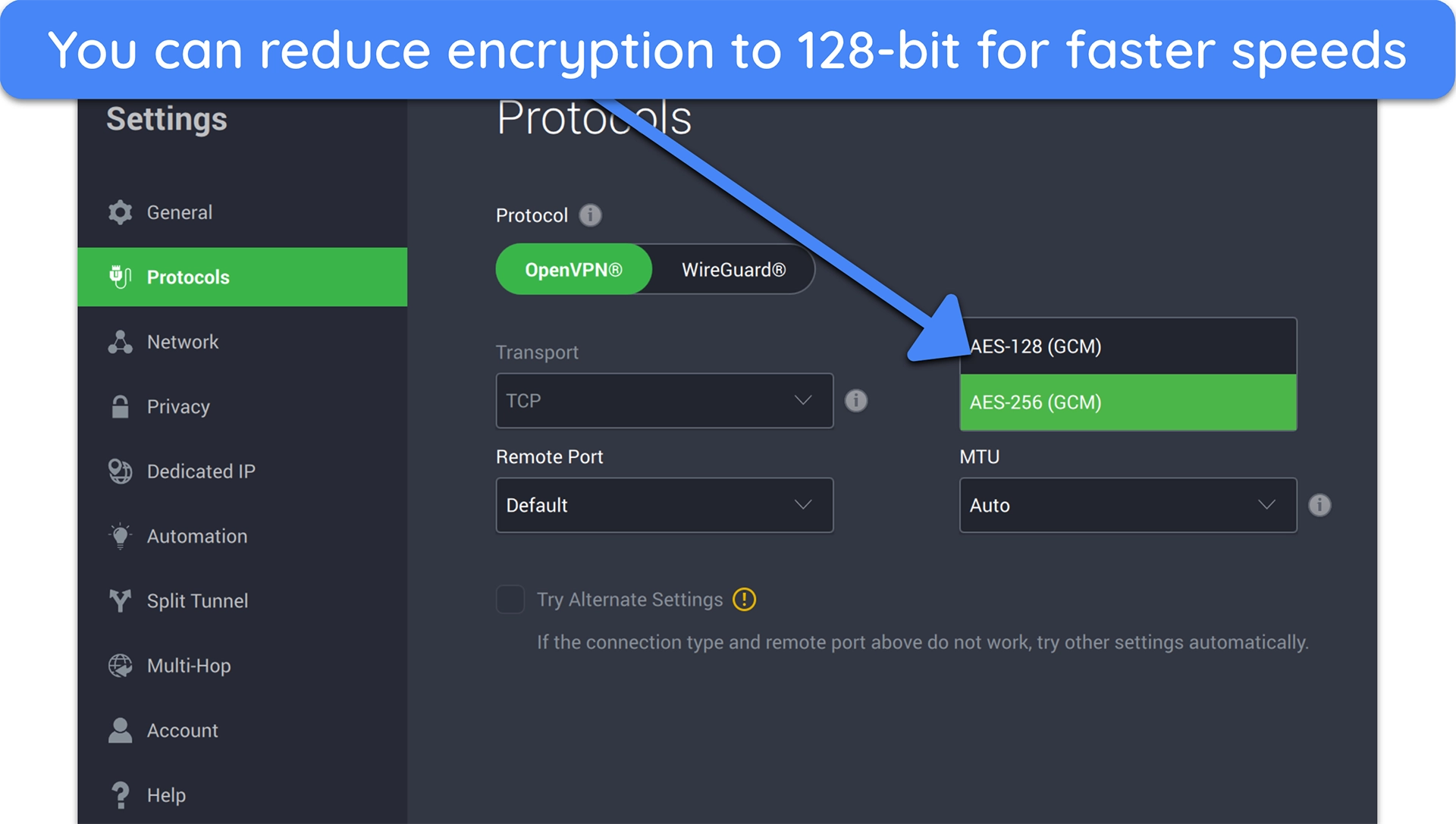
You can also tune PIA for the best Netflix performance by switching between WireGuard for raw speed and OpenVPN when you need stability on picky networks. Similarly, PIA lets you choose between 256-bit and 128-bit encryption — if you have slow internet, the 128-bit still keeps your data secure and provides a slight speed boost for buffer-free streaming.
One major advantage of PIA is its unlimited simultaneous device connections. This is great if you’ve got many screens running Netflix at once. In practice, you won’t have to worry about your home devices logging out if you decide to use your PIA account on a public computer at a library or university.
The only downside is that PIA is based in the US, which is part of the 5 Eyes surveillance alliance — this can be a concern if you’re big on privacy. However, PIA’s strict no-logs policy has been court-proven multiple times, with independent audits and open-source apps backing this up. You can try it risk-free with its 30-day money-back guarantee.
Editor’s Note: Transparency is one of our core values at WatchEverywhere, so you should know we are in the same ownership group as Private Internet Access. That said, our detailed reviews follow a strict methodology that examines all relevant performance factors to help you arrive at your own informed conclusion.
PIA works with: Windows, macOS, iOS, Android, Linux, Chrome, Firefox, PlayStation, Xbox, Apple TV, Android TV, Amazon Fire TV, smart TVs, and routers
Pricing update for Black Friday: /month for a three-year plan with 4 months free (%)!! This is a limited offer so grab it now before it's gone. See more information on this offer here.
4. NordVPN — SmartPlay Built In All Servers for Seamless Netflix Access

Key Features:
- 9055+ servers in 188 countries with specialty servers for security
- NordLynx protocol provides maximum speed and security
- Create a custom Netflix streaming profile with preset protocol and server location
- Supports up to 10 simultaneous device connections
- Includes a 30-day money-back guarantee
NordVPN’s SmartPlay feature combines VPN tunneling with Smart DNS, so Netflix simply works without you needing to adjust settings. In our tests, Netflix US, UK, Japan, and Australia worked without adjusting any settings. The big advantage here is that you don’t have to switch servers or use a separate DNS — it’s built in and always on.
Speeds are excellent with NordLynx, its WireGuard-based protocol. Even on distant servers, NordVPN came dangerously close to ExpressVPN, with drops of no more than 10%. Streaming Rick & Morty on my Netflix was perfect, though I did notice a brief period of extra buffering at the start of playback, but nothing after that.
You can connect up to 10 devices simultaneously, which is ideal for families that stream on multiple TVs and tablets. The map-style interface makes picking servers intuitive — and if you find it confusing, you can get the entire server list from the menu on the left pane.
Although NordVPN has specialized servers for security, it was a let-down to not find any streaming-optimized servers. That said, our disappointment was fleeting as all its regular servers easily accessed several Netflix catalogs around the world. You can try it risk-free with its 30-day money-back guarantee.
NordVPN works with: Windows, macOS, iOS, Android, Linux, Chrome, Firefox, Apple TV, Android TV, Amazon Fire TV, smart TVs, and routers
5. Surfshark — NoBorders Mode Lets You Stream Netflix in Restrictive Environments

Key Features:
- 4,500+ servers in 100 countries with MultiHop and static IP servers
- Decent speeds on nearby and mid-range servers
- NoBorders mode lets you stream Netflix on restricted networks
- Works on unlimited devices simultaneously
- Provides a 30-day money-back guarantee
Surfshark’s NoBorders mode is designed to get past restrictive networks, like school and office networks that typically block streaming traffic. And if you plan on streaming on an open network, its “Invisible on LAN” feature hides your device from snoopers and other third parties for privacy.
One of Surfshark’s biggest strengths is its unlimited device connections. You can stream Netflix on as many screens as you like at once, which is perfect for families or shared households. Its apps are simple to use across platforms, with quick-connect options for instant streaming.
Its MultiHop servers are good if you need extra security, but I wouldn’t recommend using them for streaming, as they slow down speeds significantly. Even regular servers can be a bit slow on distant servers. As long as you stick to nearby locations, streaming shouldn’t be an issue. Surfshark comes with a 30-day refund policy, so you can try it risk-free.
Surfshark works with: Windows, macOS, iOS, Android, Linux, Chrome, Firefox, Xbox, Apple TV, Android TV, Amazon Fire TV, smart TVs, and routers
Comparison Table: 2026’s Best VPNs for Netflix
| Server Network | Streaming Servers | Average Speed Dip | Smart DNS | Money-Back Guarantee | |
|---|---|---|---|---|---|
| ExpressVPN | 3,000+ servers in 105 countries | ✔ (all servers) | 6% | ✔ (MediaStreamer) | 30* days |
| CyberGhost | 11,690+ servers in 100 countries | ✔ (special Netflix servers) | 13% | ✔ | 30 days |
| PIA | 29,650+ servers in 90 countries | ✔ (select streaming servers) | 16% | ✔ | 30 days |
| NordVPN | 9055+ servers in 188 countries | ✘ | 8% | ✔ | 30 days |
| Surfshark | 4,500+ servers in 100 countries | ✘ | 17% | ✔ | 30 days |
Editor’s Note: We value our relationship with our readers, and we strive to earn your trust through transparency and integrity. We are in the same ownership group as some of the industry-leading products reviewed on this site: ExpressVPN, CyberGhost, Private Internet Access, and Intego. That said, our detailed reviews follow a strict methodology that examines all relevant performance factors to help you arrive at your own informed conclusion.
How I Tested and Ranked the Best VPNs for Netflix
To find the best VPNs for Netflix, we rigorously tested the top VPNs in 2026 and picked ones that reliably work with the platform. Besides this, I also considered these factors:
- Fast speeds — We measured the performance of each VPN using a variety of servers, prioritizing those that keep speeds fast enough for UHD streaming (25Mbps minimum).
- Global network — I picked VPNs with servers in multiple regions so they can work across most Netflix regional libraries.
- Smart DNS — I preferred VPNs with Smart DNS functionality, which lets you stream Netflix even on devices that don’t natively support VPNs, like gaming consoles.
- Compatibility — I chose VPNs that work on all popular platforms, including Windows, macOS, iOS, Android, and Amazon Fire devices, so you can watch Netflix on any device.
- Money-back guarantee — We tested each VPN’s refund policy and considered the ease of claiming a refund, plus its duration.
3 Easy Steps: How to Watch Netflix With a VPN in 2026
- Get a VPN that works with Netflix. For reliable connections to Netflix and fast streaming speeds, ExpressVPN is my top choice recommendation.
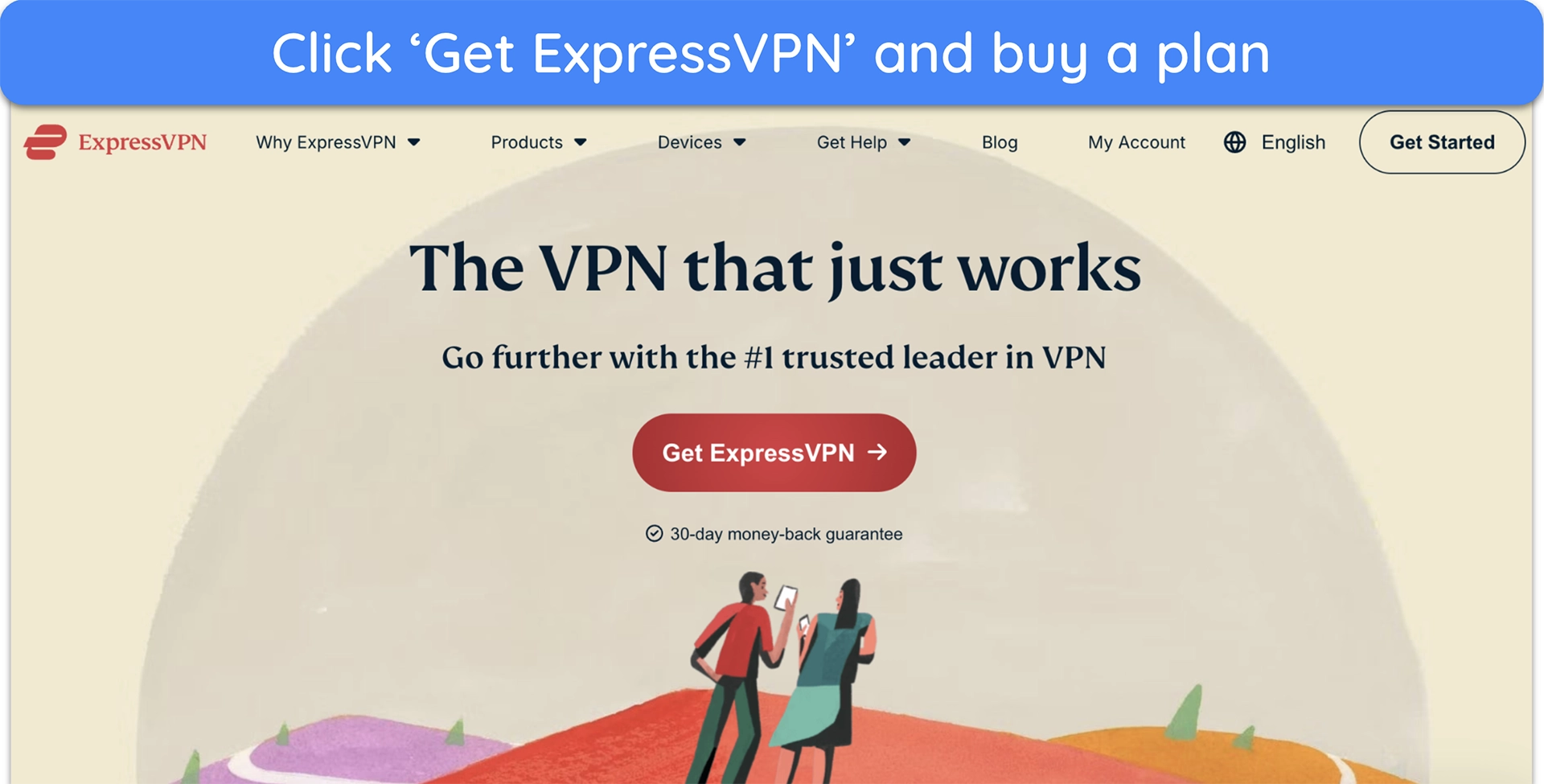
![Screenshot of ExpressVPN's official website homepage]()
- Connect to a server. Pick a server or let the VPN find the best option for you automatically.
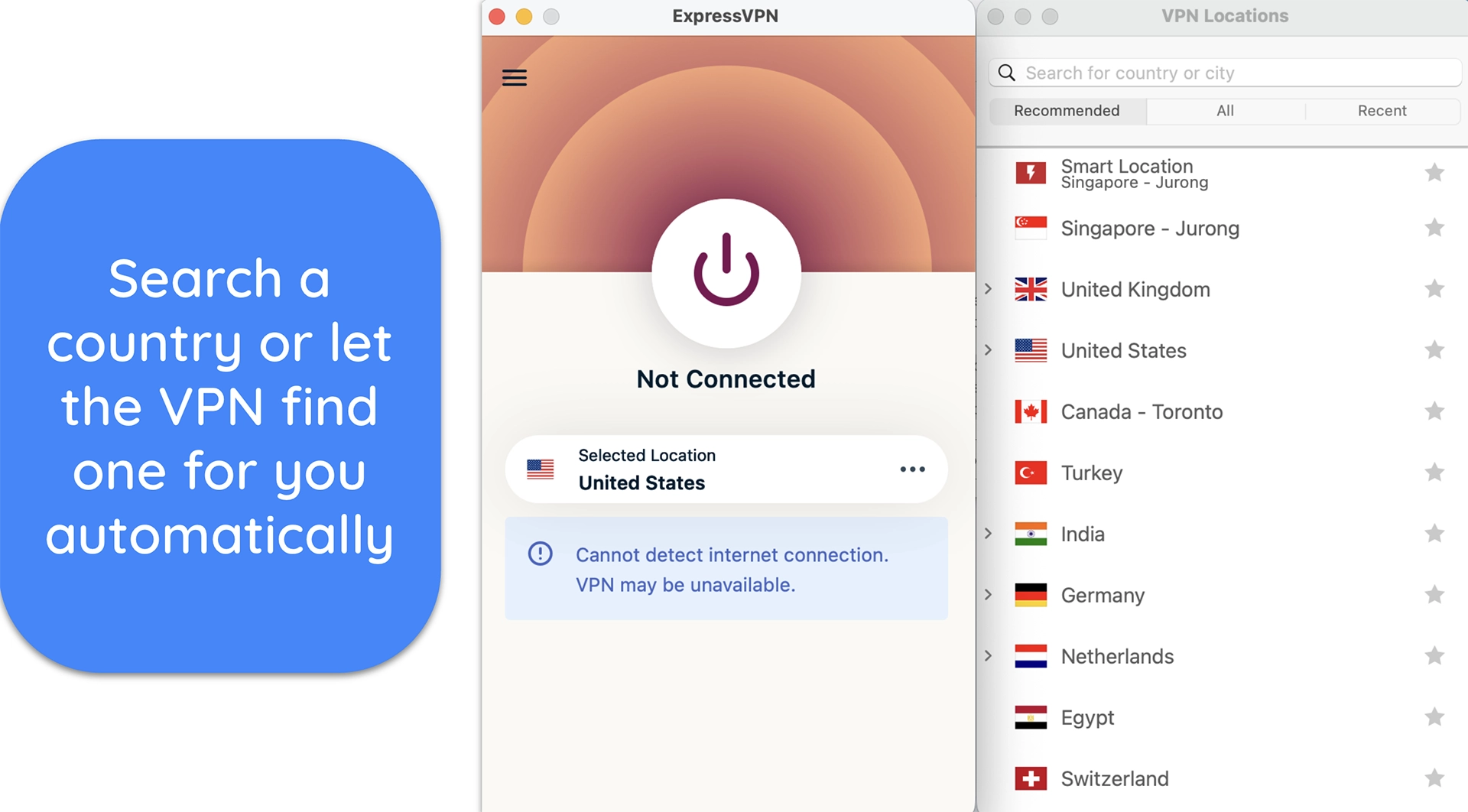
![Screenshot of Netflix's server locations list]()
- Start streaming. Log in to your Netflix account and watch your favorite content.
Editor’s Note: Transparency is one of our core values at WatchEverywhere, so you should know we are in the same ownership group as ExpressVPN. That said, our detailed reviews follow a strict methodology that examines all relevant performance factors to help you arrive at your own informed conclusion.
Troubleshooting Common Netflix VPN Issues
Even the best VPNs sometimes hit Netflix’s detection system. If you’re seeing proxy errors, slow playback, or limited libraries, don’t panic — these issues are usually quick to solve with the right steps. Here are the most common problems and how to fix them:
- Netflix proxy error — Switch to another server in the same country first. If that fails, clear your cache, disable extensions, or use an optimized/obfuscated server. Support can also tell you which servers currently work best.
- Slow streaming or buffering — Distance and server load usually cause this. Pick a server closer to you, change to a faster protocol like WireGuard, or switch to wired internet. On slower networks, drop encryption to AES-128 for extra speed.
- Limited library (Netflix Originals only) — This means Netflix has partly flagged your VPN. Change to a different region server, use obfuscation/stealth modes, or ask your VPN’s support team for alternatives that bypass the block.
- Smart TV or console setup problems — Since these devices don’t support VPN apps, use Smart DNS, install the VPN on your router, or share a VPN connection via mobile hotspot. These workarounds let you stream on the big screen without hassle.
- Account sharing warnings — Netflix now enforces “household” rules tied to IP addresses. If you switch server locations too often, you might get flagged. Stick to consistent servers in one country to avoid triggering these alerts.
FAQs: VPNs and Netflix
Does Netflix still allow VPN?
Does the Netflix VPN trick still work?
Does Netflix know I use a VPN?
Which VPN can Netflix not detect?
How to use a VPN with Netflix?
Keep Up With Your Favorite Shows on Netflix
Finding a VPN that works well with Netflix is tricky because the platform is constantly updating its detection systems. That’s why it’s not enough for a VPN to just connect once — it needs to deliver consistent access, strong speeds, and device flexibility over the long term. The trick is to get a VPN that offers solid streaming performance and reliable security.
Out of all the VPNs I tested, ExpressVPN proved to be the most dependable choice for Netflix. Its Lightway protocol maintains smooth UHD streams, and MediaStreamer expands support to devices like smart TVs and consoles. You can see how it performs with your own setup, since ExpressVPN offers a 30*-day money-back guarantee.
Editor’s Note: Transparency is one of our core values at WatchEverywhere, so you should know we are in the same ownership group as ExpressVPN. That said, our detailed reviews follow a strict methodology that examines all relevant performance factors to help you arrive at your own informed conclusion.
*Please note that ExpressVPN’s generous money-back guarantee applies to first-time customers only.
Summary — The Best VPNs for Streaming Netflix in 2026



Editor’s Note: We value our relationship with our readers, and we strive to earn your trust through transparency and integrity. We are in the same ownership group as some of the industry-leading products reviewed on this site: ExpressVPN, CyberGhost, Private Internet Access, and Intego. That said, our detailed reviews follow a strict methodology that examines all relevant performance factors to help you arrive at your own informed conclusion.